
1. NOOM
A 2D, Tower Defence game as part of a Game Jam. Shown skills of C# Unity Programming, Git & Jira.
In the first month of the Game-jam we spent most of our time doing thorough research around the general idea of the game and methods we can use throughout the process to achieve a complex and enjoyable game. We decided to take inspiration from games like Clash of Clans, Balloons TD and Dome Keeper. Our end goal of a game was: In the daytime, you collect resources and build defences around your town hall in the centre of the map, then at night when the enemies come, you’re to help defend your base from being destroyed. The game would also come with sub-menu upgrades and purchases.
We decided to use Jira to manage tasks within the group which went very well. This helped a lot more than I thought, as it allows for set progression to be made weekly and can show what everyone is working on. For source control – which I have learnt from previous game jams is very important – we used Git Bash to push and pull our project onto GitHub.


Once we had our first basic set ideas, I began work on a demo version of the game. This was a very basic movement system with stock images, but with this start it allowed for the rest of the team to begin working and adding to it. Throughout the Jam I was mainly in charged by the main player, it’s attacking, movement systems, interactions with environment and enemies etc.
Having experience with Unity in 3D games, I found learning coding for our 2D game very interesting and fun! I found that numerous of aspects were similar, just without a 3rd axis.
I began work on a simple map that the player can play on, in the instance of using stock images to make a map and also a bounding box with collision for the player and enemies. I also worked on the different mechanics for the player with zooming the camera, animation of the main attack.
First Demonstrational Video:


After 3 months into the Game Jam, our game is getting to a playable stage. We have a grid building systems, with enemies that path-find their way to the town hall by attacking walls and nearby buildings in its route. The player has a good basis in order to completely play the game. I also worked on a helpful debug menu, in which allows us as developers to ‘cheat’ the game by using God mode, no collision, teleport etc. This came in very useful for the whole team to be able to quickly and efficiently test certain aspects of the game. I also worked on the static HUD that would be the main display showing health, resources and a time-of-day clock that cycles based on time in game. I felt that the game needed menus, so I added a simple but effective main menu screen and pause menu.
So far in this game jam I have definitely felt that using programs like Jira, Git and even discord to manage our workloads has come in super useful. An area of improvement I have found so far would be to assure that each member of the technical team should have their own private folder in Unity, so we have less issues “merging’ our projects after working in the same scripts/gameObjects/scenes.


Coming up to the final month of production, the game was getting closer to the final product. At this point, art was seriously lacking for the game. Although we had a decent programmed game with good mechanics, gameplay and survival necessities, the lack of artwork and having to use unity sprites limited it massively. I spoke with production and decided to help with the art to get the game up to scratch. I had created; various map tiles with pathing that interconnects; All HUD icons; Hot bar; stats menu; minion hut; stone miner drill; trees; base tower for enemies to be placed on with a broken version; archer character; bear trap; wall tiles for every direction; grid highlighting square; mouse cursor; villagers (minions) and a demolish icon with screen border to go with it. With all of these I put them in the art discord channel for everyone to give opinions on, in which I acted on created versions for most of my artwork provided. An area that I had to keep strongly in mind is keeping in line with the art style. Although we all have our own styles, I had to try to match what had already been created, in which I felt I did well on, but did really struggle with getting the 2.5d aspect. I would keep creating art that either was too 3d or 2d or wrong angles on the lines. However, the team and myself all felt that my artwork fit the game nicely, bringing the game up in the overall looks and ultimately gameplay.

In this period, alongside doing a great majority of the artwork for the game I was still also doing my part with the programming. Adding more visual information for the player was something we all felt was important, so I added HUD popups for things like the base health, stamina, sword swing delays and resource counters. An area that I continued to struggle with was the HUD being different on everyone else’s displays but realised that I had to make the parent objects of my HUD children objects all anchor to appropriate locations or stretching them like the backing panel across the whole screen. Something that I had learnt was about referencing scripts from other game objects, instead of referencing the whole Game Object and extracting scripts from that object, I can just reference the script itself and set that to the variable type. I found that this greatly improves performance of the game. With doing this artwork, I had always made sure to implement it and assure that it works well.
Not having used prefabs before, working with my team in which prefabs had been used for lots of the buildings I had to learn and adapt to getting information to and from them. After learning about how prefabs can be useful for spawning multiple of the same object, I would love to start using these in future projects. I also learnt that to link game objects that don’t exist as prefabs and are just spawned into that scene, to reference those I would have to used GameObject.Find to get information to and from them, but this can be very computationally intense, so in the future, to go around this, I can just put components on the prefab and use them there (for example, instead of finding the sound controller in my game – which I had done – I can just make a new sound controller on the prefab and use it that way).
Throughout this process, I always made sure to test run the game for bugs and performance issues. When my teammate had made a system for minions to be assigned to wood collectors, I found through testing that having multiple collectors in the scene and also at the start of day when they started collecting wood, it would cause serious lag spikes. I also discovered how the pathfinding for enemies caused serious lag because they would all spawn at the same time being very computationally powerful having to all decide a path at the same time, and to go around this I simply made a spawning system in which a delay is made between each enemy spawn, and they would only spawn when my time-of-day system would hit nighttime.
An area that I wanted to change that hasn’t been touched from the start was the camera. We originally just had a system to press Z to zoom out then in, but I felt this was too janky, so I simply put the camera zoom on the mouse wheel, with constraints to prevent too the camera zooming too far out/in. This made the ability to simply look around the map more fluent.
We decided not to have a saving system and currently the game didn’t have warning messages when returning to the main menu (this would cause the scene to be reset) so I added basic “press ok to continue’ messages. This was just another aspect to more accurately relay information to the user.
In this final 2 weeks of game development leading to the final deadline I managed to add a lot of features but also came across a few big issues. I did a bunch more user interface work included a fully function death system and display when the base health reaches 0, with a death screen prompting to either retry or go back to the main menu. I continued having issues with anchoring, and the pause menu panels not stretching, but again applying what I learnt before, applying the parent anchors the correct anchors.

When I was building the game for a playable exe, I kept getting lots of debug errors and warning, but after removing all the unnecessary libraries, I found that’s what caused all the errors and got a successful build.
I did attempt to implement a cursor, at first, I just made a gameObject on the canvas that would just follow where the mouse is, replacing the mouse cursor, however, this caused lots of issues when in menus and trying to click on options due to the mouse being disabled on screen. To go about fixing this, I would have to convert my cursor png to an icon and add it through the project settings.
Getting visual feedback on things was a big thing as it was lacking. I added a slider to show the delay between swinging your sword which just increases with the delay of the sword over time (0.7 seconds). Using an animation from the art team I also implemented the axe swinging and worked to swing the axe when mining resources, also adding a similar slider to this axe to show progress of the mining process. I had a big issue that I struggled to solve that the imported assets of the axe swing animation were really big, and when playing the animation, the player would grow to a huge size then back down to when the Idle animation would play. After lots of trial and error and research, it came down to just resizing the frames in an external tool to match the same as the idle artwork. Working in the axe, I worked a lot with Max Collin to get it working to gather resources and make sounds work with it.


Deciding as a team that the enemy spawning needs reworking, I took it upon myself to changed it into set waves per round starting with 5 enemies, then each round would increase in numbers. I also decided to slowly introduce enemies, starting on the first night just the basic melee enemy, then 2nd would be the ranged spear men, then the 3rd night would be the final enemy, the flying one. I also added tips on screen when each night would start to describe the enemy to the player. Reworking this took a lot of time, however, it was nice that I didn’t get too many errors or problems going around this, apart from occasional lag in game, which was later fixed by other team members in their scripts. I also added a visual counter to show how many Nooms are left on that night. The Time Controller script was worked and re-written the most out of this process for me, and from this I know that I need to comment and make my code more accessible and efficient as I would keep finding myself getting confused where to add code, in my own script.


After my teammate creating a way of demolishing with functions, I then worked on making it much more accessible to the user, by pressing B to active demolish mode, which would make a short sound and a border around the screen, and the player would then click on structures to demolish.

I worked even further on the HUD as reports from other people playtesting, there was still the lack of ‘What to press’ and ‘What to do’, so to counter this I added more visuals on the HUD to show the player how to do stuff and what to press to do it, for example just visually numbering the hot bar and organising the HUD in a neater way. Also, implementing a full ‘How to Play’ guide on the main menu, which through a series of buttons you can click through pages that show how to play the game and what each feature does. The only issue I had with this is just simple logic problems, which knowing which game objects to set active and inactive, which is fixed easily by neat organisation of the hierarchy and putting each page under one parent variable. I made sure to write out detailed and simple but effective story for the character.


One of our biggest walls came on the 04/05/23 in which I thought that the base needed a way of healing, simply by slowly regenerating health in the daytime. I took a few hours to try to implement this into my teammates code, coming to myself, Max C and Jake E to all trying to work on this together, however, through using the healing functions on the base, we could not find why this didn’t work at all. We kept getting errors where it didn’t make sense and would open other issues fixing one thing (For example, we fixed errors around the structure attack points, but then errors came around for enemies attacking the base). The ultimate cause of this was that this code we are fixing is months old now and had little comments on it, making it hard to know where to fix these errors, and adding new features is made hard, so for next time we know that our code needs to be made from the get-go more flexible, modular and commented. Rather than a base regeneration, we decided to simply boost the health of the base from 100 to 500.
We’ve had a debug mode since near the start now, but I wanted to turn this into an administrative mode in which on the final build, only the developers could access this. For this, I added a text box in the options in the main menu for a password input, that if correct would allow the user to access the admin menu, but also displaying the console log to the screen. This ended up being very useful in testing, but it did take me a very long time to implement, simply because of my lack of knowledge in transferring data between scenes. Through lots of research on the forums (derHugo, 2020) I ended up using singletons to store data in, also making use of the DontDestroyOnLoad function to keep the game object and the data in it across to any scene. This meant that in the main scene, I could GameObject.Find that game object and get the data from there. I needed this because of the need to check if the user entered the correct password on the main menu scene, then allowing the player to open the admin menu and also continuing to display the console log.

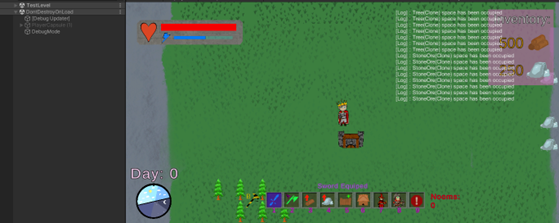
The final week till hand-in.
This week was time to focus purely on bugs in the game that were found through playtesting done by myself and others in my team. One of the biggest bugs were found in my admin menu when built that after typing in the password and playing the game, I would often crash. To fix this I simply checked the variable to see if its nul or not, if it is, then the code will not run saving a crash from occurring. I did have issues with this check running, because the first time I tried it, I attempted to check if the ‘adminModeFetch’ variable was valid rather than the game object itself which solved the issue.#
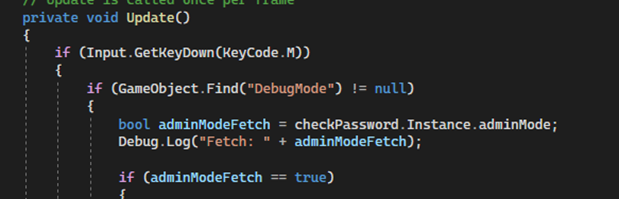
Through this time, I also kept changing values of variables to nerf and buff certain things such as the sword swinging delay, damage and spawn rate of enemies. I also added day by day tips on enemies to help the player understand what they’re up against. I had lots of logic issues with this, with enabling and disabling the correct game objects. Firstly, I text overlapping with it not disabling the next night, but then sometimes not enabling any text at all. To do this I made sure to disable and enable each day in their own if statements.
I definitely think I can do this code more efficiently and professionally through using iterative loops or compressing the code down with less if statements.


As one of the only members of the team that knows a decent amount about making videos, I oversaw gathering the material and editing the final 20-minute video. I felt it went well, however, with producers leaving this task with only 1/2 days’ time frame, I do feel I could’ve improved the flow and editing of the video. I also learnt about premier pro, using song Vegas for previous projects, I decided to try out premier pro which I enjoyed adapting skills to.
Overall, as one of my biggest projects yet, I am proud with how the final project was! With functional and enjoyable gameplay mechanics, visual feedback and a good gameplay loop, we as a team managed to create something of value to us. I have learnt so much through this game jam, not only by just getting bits of help from the internet, but also through teammates and lecturers who have allowed me to develop my code into a much more efficient program.
Areas that I would love to focus on more is professionalism and organisation. Shown by the picture below, my organisation or assets is poor and to fix this, simply by using appropriately named folders and also renaming assets/prefabs what they accurately do/are. To go along with this, showing professionalism in my code is another area I need to focus on, which can be done through mainly comments and modularity, using comments to describe what small chunks or lines of code do where its not easily obvious, and using functions and object orientated programming to develop ‘layers’ of module code that can be re-used and easily read.

derHugo. (2020, February 26). Answer to ‘How to pass data (and references) between scenes in Unity’. Stack Overflow. https://stackoverflow.com/a/60408573